

Backlink health is what you have now, not what you built. Links get removed, nofollowed, stranded on dead pages, or left on sites that have since changed hands, and none of it announces itself. Here are the four ways a link degrades, how to check each, and the numbers worth tracking monthly.
Every link report counts what was acquired. Almost none count what is still working. The gap between those two numbers widens every month, quietly, because nothing tells you when a link goes bad.
A healthy profile is not one that was built well. It is one where the links that were built well are still live, still followed, still on pages that exist, and still on sites worth being linked from. Each of those can fail on its own.
Why a link count is not a health check
The usual mistake is treating a link as permanent once it is placed. In practice a link has a lifespan, and the profile you reported six months ago is not the profile you have today.
Three things make this worse than it sounds. Losses are silent: nobody emails you when a link is removed. Backlink tools keep reporting dead links for weeks or months after they go. And a link can look present in a tool while doing nothing, because it is now nofollowed or the page is no longer indexed.
So the useful question is not how many links you have. It is how many of the links you count are working right now.
The four ways a link degrades
- Removed. The source page still exists, but your link is gone. Edits, redesigns, content refreshes, or a publisher cleaning up outbound links. The most common failure and the hardest to notice without checking.
- Dead source. The page that linked to you is gone: deleted, returning a 404, redirected elsewhere, or set to noindex. A page nobody can reach passes nothing.
- Downgraded. The link is still there but has changed. A rel=”nofollow” or rel=”sponsored” added in a policy change, the link moved from the body into a footer or resources block, or the anchor rewritten. What each attribute means is covered in nofollow vs sponsored vs UGC.
- Degraded host. The link and page are fine, but the site around them is not. It started selling placements, its outbound linked domains jumped from 90 to 400, its traffic collapsed, or the domain expired and was rebuilt by someone else. Your link now sits in a neighbourhood you would not have chosen.
One more failure happens on your side rather than theirs: the link is fine, but the page it points to on your site has moved or been deleted. That is covered in how to reclaim lost backlinks, and the fix is a redirect rather than an email.
How to check each one
Removed: open the page. Load the source URL and search it for your domain with Ctrl+F. Ten seconds, and more reliable than any index, because you are looking at the page as it is now. For volume, Ahrefs Webmaster Tools has a lost backlinks report for verified sites; the free workflow is in how to check backlinks for free.
Dead source: check the status and the index. If the page returns a 404 or redirects away, the link is gone. If it loads, search site: plus the exact URL in Google. No result means the page is not indexed and the link is doing very little.
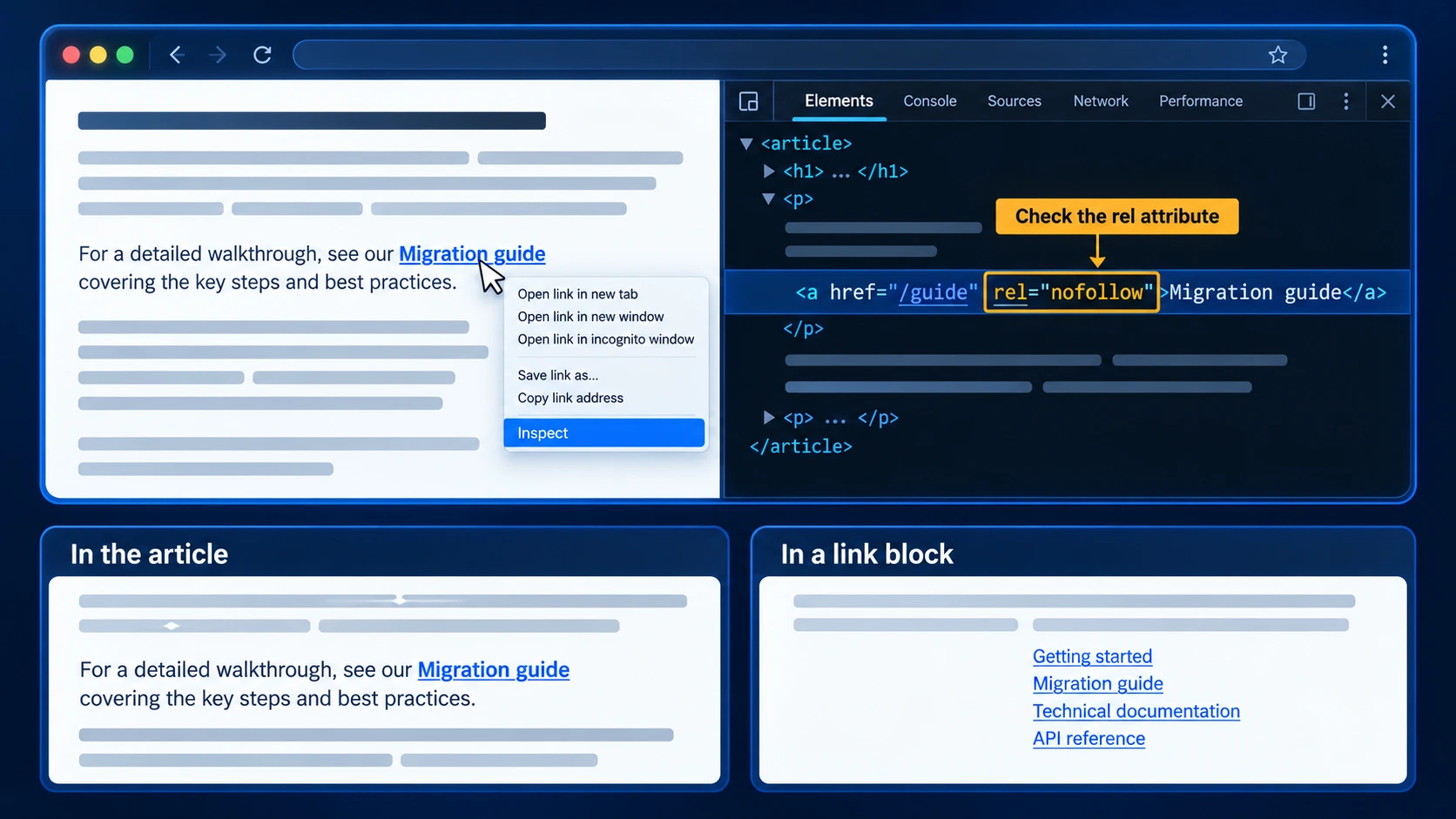
Downgraded: inspect the link. Right-click it, choose Inspect, and read the rel attribute in the highlighted HTML. Note where the link sits: inside a paragraph of the article, or in a block of links at the end. Compare against what was agreed.
Degraded host: look at the site, not the link. Three checks: outbound linked domains now against when you placed (a sharp rise means placements are being sold), a write-for-us page with a price list that was not there before, and the estimated traffic trend. Then read two recent articles. Generated filler is obvious to a person and invisible to a metric.
A twenty-minute monthly routine
You do not need to check every link every month. Check the ones that matter, and sample the rest.
- Export lost referring domains from Search Console’s Links report or Ahrefs Webmaster Tools, and compare with last month
- Check your top twenty links by value by hand: open, search, inspect. These are the ones whose loss you would feel
- Sample ten others at random. If the sample turns up problems, widen the check
- Look at referral traffic per linking domain. A partner that used to send visitors and now sends none is worth opening; the link may be gone, or the page may have lost its audience
- Log what you found in the same sheet as your placements: date checked, status, action
Survival and partner drift are two of the audit controls set out in the advanced link exchange strategy guide. Quarterly, add the broader programme audit in how to check if your link building is working, which also covers anchors, velocity shape and your own outbound profile.
The numbers worth tracking monthly
| Number | What it tells you |
| Net referring domains (new minus lost) | Your real growth rate. Gross acquisition overstates it |
| Survival rate on links older than six months | How much of what you built is still there |
| Share of tracked links still followed | Whether downgrades are eroding the profile quietly |
| Partners flagged as degraded | Where your links sit in neighbourhoods you would not choose now |
| Referral sessions from linking domains | Proof the linking pages are real and read |
Net referring domains is the one most people have never calculated. A site gaining seven a month and losing three is growing at four, not seven, and every plan built on the bigger number is wrong.
Worked example: a year-old programme’s first health check
A DR 38 site with 140 referring domains, building about six links a month through exchange and outreach. First proper health check after a year.
Removed. Of 72 links placed more than six months ago, 61 were still live: a survival rate of 85%. Six of the removals came from two partner redesigns, and an email to each restored four.
Dead source. Three linking pages now returned 404 after a partner pruned its archive. Nothing to recover.
Downgraded. Five links had gained rel=”nofollow”, all on one partner that changed its outbound policy site-wide. Two more had moved from the article body into a further-reading block.
Degraded host. Two partners had more than tripled their outbound linked domains since placement, and a third had published a sponsored-posts price list. All three were dropped from future placements, with existing links left in place.
The result. The dashboard showed 140 referring domains. The working, followed count was closer to 125, and the site had been planning its next quarter against the bigger number.
What not to count as unhealthy
Low DR on its own. A relevant DR 20 site with real readers is a healthy link. Health is about whether the link still works and still sits somewhere reasonable, not whether its metrics impress.
Toxicity scores. Third-party toxicity metrics are vendor heuristics, not Google signals. They raise alarms without telling you which of the four failures above has actually happened.
Spam you did not build. Every profile collects scraper and directory links. Google’s stated position is that it ignores most of them, and they are not part of the profile you are maintaining.
A nofollow that was always a nofollow. An editorial link someone chose to nofollow from the start was never a followed link. It is not a downgrade, and it can still send traffic; see what is a nofollow link.
The response to an unhealthy link is almost never to disavow it. Fix what you can, stop placing with degraded partners, and build new links to replace what was lost.
Where the plugin fits
The part of this that slips first is monitoring. Checking twenty links by hand each month is manageable. Checking every link continuously is not, and losses compound in the months nobody looks.
Linkexchange monitors the placements made through it continuously, so a removed link surfaces when it happens rather than at the next audit. Referral traffic is attributed per link, which is the same signal the monthly routine above relies on. For links built any other way, such as guest posts, outreach and relationship links, the manual routine still applies.
The free internal linking tools cover the other half of health: the inside of your site. Broken internal links and 404s, orphan pages, weak pages and authority flow, so the links that do arrive actually reach the pages you want ranking.
The short version
A backlink profile decays by default. Links get removed, source pages die, attributes change, and partner sites drift. None of it is announced.
Check your most valuable links by hand every month, sample the rest, and track net referring domains rather than acquisition. Count the links that work today. That number, not the one you built, is your profile.